Exorcising Big Tech: The Reference Manager
Contents
- Some lesser known tips for using Zotero (better)
- Format your titles correctly in the first place: Sentence case, short titles and italics
- Generally, be as thorough and accurate as possible when you put something into Zotero
- Some item type workarounds
- Use prefixes and suffixes
- Before you submit, save and then unlink
- Edit the bibliography output in the document preferences
- Plugins are your friend
- Zotero is also an RSS feed manager – use it for journals and blogs
- Closing thoughts
This is the third of my blog posts detailing how I am and have been trying to remove big tech from my life. Read the introductory post first: Exorcising Big Tech. Also check out my post on switching operating systems, office suites and web browsers.
My bottom line: Use Zotero.
For once, the choice is easy. It’s Zotero. Zotero is the best, cheapest and most ethical reference management software, and it’s not even close. It is free, open source, run by a nonprofit (Corporation for Digital Scholarship, based in the US), and at least on a par with, if not more powerful than, all its competitors.
Wikipedia has a good comparison table, but here’s my own covering just the main competitors I hear about and my take on them.
| Software | Ownership | Price | Open Source | Selling Point (What They Promote About Themselves) | The Catch |
|---|---|---|---|---|---|
| Zotero | Corporation for Digital Scholarship (USA) | Free, extra storage for $20–120/year | ✅ | Free, open source, run by a nonprofit, frequent updates, forum-based, quick support | Based in the US |
| Citavi | Lumivero (US) | Free trial, then $90–300/year or $320–500 one-time purchase | ❌ | Efficiency, productivity, large libraries | Not free or open source, for-profit, US-based |
| EndNote | Clarivate (UK & US) | Approximately €185–340, one-time purchase | ❌ | AI-powered | ‘AI-powered’, not free or open source, for-profit, US-based |
| Mendeley | Elsevier (Netherlands) | Free tier, or $4.99–14.99/month | ❌ | AI-powered | ‘AI-powered’, not free or open source, run by parasitic, for-profit academic publisher Elsevier |
| RefWorks | Clarivate (UK & US) | ? (you apparently have to email them to get either a trial or pricing) | ❌ | Easy-to-learn, whole research workflow | Not free or open source, for-profit, US-based |
| Paperpile | Paperpile (US) | Free trial, then $2.99–9.99/month | ❌ | Modern UI, Google Scholar and Docs integration | Not free or open source, for-profit, US-based |
There’s really no choice, in my view. Zotero also has good Linux support, which many of these lack, so that’s another plus.
So, instead of talking about my hand-wringing and deliberation about switching, I’m going to focus on some tips and features about Zotero that people often miss, in my experience. Because this really is a situation where when people complain about Zotero ‘messing up their citations’ or things like that, it is, almost always, user error. I won’t apologise for being Zotero’s biggest fan.
Some lesser known tips for using Zotero (better)
There are plenty of guides out there that teach you how to use Zotero. So these are just little things that give you the last 10% of polish. A lot of frustration and extra work comes from cleaning up the references at the end. But if you’re diligent and know a bit about the system, you will have to tweak almost nothing at the end.
And even if you don’t care about your own time and effort to this end, think of the poor copyeditors and proofreaders. I do a lot of voluntary work of that kind, mostly for Eludamos. By far, bar none, without a doubt, easily the biggest timesink and general frustration of the task of preparing an article for publication is fixing references. It can easily take several hours to fix a reference list that makes a habit of missing or incorrect information. If you’re an author I’m copyediting whose manuscript has a pristine bibliographies, I genuinely think more highly of you as a person. That’s how much of a favour it feels to have this stuff down. And if this sounds patronising, I can tell you from experience that the vast majority of you do not have this stuff down.
Format your titles correctly in the first place: Sentence case, short titles and italics
It’s easier to programmatically transform sentence case into title case than vice versa. If you right click on the Title, you can select Sentence case to do this automatically, althought it doesn’t always treat proper nouns with the respect they deserve. Using the Short Title field, you can also make it correctly capitalise the first letter of a subtitle. Put the everything before the colon in the Short Title field. You can also use HTML tags like <i> </i> to italicise words. Input titles into your Zotero in full sentence case like this:
❌ "Honor Died on the Beach": Constructing Japaneseness Through Monstrosity in Ghost of Tsuhsima
✅ "Honor died on the beach": constructing Japaneseness through monstrosity in <i>Ghost of Tsushima</i>
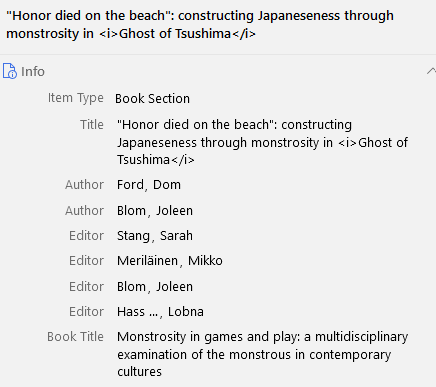
Proper nouns are always capitalised anyway, and each referencing style has different rules for whether to render titles in sentence or title case, and even in what ‘title case’ even entails, exactly. Storing it in sentence case and letting the parser handle the title case is the most robust solution. With the correct example above, Zotero outputs it like so:
APA 7
Ford, D., & Blom, J. (2025). ‘Honor died on the beach’: Constructing Japaneseness through monstrosity in Ghost of Tsushima. In S. Stang, M. Meriläinen, J. Blom, & L. Hassan (Eds), Monstrosity in games and play: A multidisciplinary examination of the monstrous in contemporary cultures (pp. 25–44). Amsterdam University Press. https://doi.org/10.5117/9789463725682_ch01
MLA 9
Ford, Dom, and Joleen Blom. ‘“Honor Died on the Beach”: Constructing Japaneseness through Monstrosity in Ghost of Tsushima’. Monstrosity in Games and Play: A Multidisciplinary Examination of the Monstrous in Contemporary Cultures, edited by Sarah Stang et al., Amsterdam University Press, 2025, pp. 25–44. https://doi.org/10.5117/9789463725682_ch01.
Chicago author-date
Ford, Dom, and Joleen Blom. 2025. ‘“Honor Died on the Beach”: Constructing Japaneseness through Monstrosity in Ghost of Tsushima’. In Monstrosity in Games and Play: A Multidisciplinary Examination of the Monstrous in Contemporary Cultures, edited by Sarah Stang, Mikko Meriläinen, Joleen Blom, and Lobna Hassan. Amsterdam University Press. https://doi.org/10.5117/9789463725682_ch01.
These references need literally no clean-up or editing – I haven’t touched them after pasting.
Generally, be as thorough and accurate as possible when you put something into Zotero
As my grandmother used to say, “a stitch in time saves nine”. The browser extension and ‘Add Item(s) by Identifier’ feature are both fantastic, but entries will almost always need some cleaning afterwards. Better to do it right away once than every single time you later use that reference. Common errors in entries added automatically:
- Wrong case for titles.
- Author names missing or input incorrectly (e.g., as a single field instead of a last name and a first name).
- Non-authors included as authors (sometimes publishers are listed as an ‘author’ in the metadata).
- Missing or incorrect container title (e.g., the title of an edited collection).
- Missing or incorrect page numbers.
- Incorrect
Item Type(e.g., marked as a web page when it’s a blog post, or a journal article when it’s a dissertation).
Using just the raw output of these tools is probably the number one reason why references will come out slightly off.
Some item type workarounds
Zotero has many item types, but occasionally you’ll look down the list and won’t find anything that really fits. Zotero developers are fairly restrained when it comes to adding new types, preferring not to clutter the list too much and to instead use item types and fields creatively.
Games and using item types generously
In my field, probably the most common wall that people hit is that there is no ‘game’ or ‘videogame’ item type. My preferred way of referencing games is not supported (I could – and one can – edit the CSL to make this possible, but I haven’t found the time or energy yet), so I often end up doing that manually. But, to be fair, we don’t usually get to choose our preferred way of referencing anything anyway, so in practice it is rarely an issue.
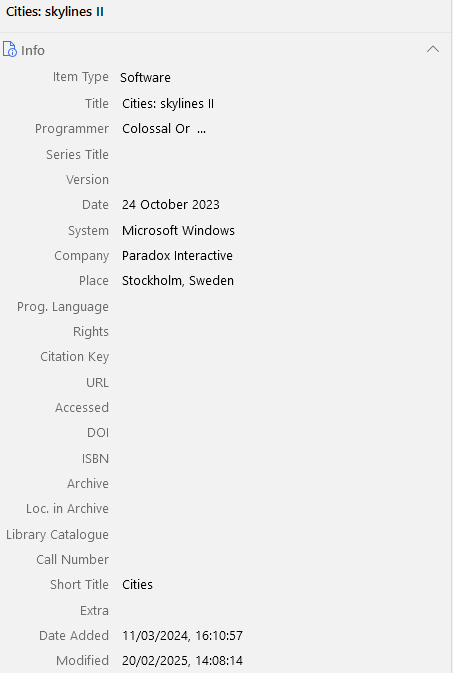
In any case, put games in as Software. Input everything as normal, but put the developer in as Programmer. Click the little boxes next to the plus and minus symbols to switch the name field from two fields (i.e., first name and last name) to a single field (for mononyms, organisation names, etc.).
TV series and using date ranges
It is often unclear how to input a TV series rather than a single episode, but you can put both in as a TV Broadcast with a little help from the Extra field.
The trick for a series is to put in the creators each as a Director. It’s obviously not strictly true, but it’s because for the TV Broadcast item type, Director is what is mapped to the more abstract reference field of author. For TV series, we often want to use the show’s creators or showrunners or executive producers in the author field rather than directors (after all, for a whole TV series there may be tens of directors).
The next issue for something like a TV series (but also many things besides) is that it doesn’t have a publication date, it has a run, a range of dates. You have two main options here: you can input the date it first started, or you can input a date range.
To input a date range, we have to use the Extra field. Here you can do all sorts of magic – it’s basically the dumping ground for additional types and fields and inputs that don’t (yet) have full integration. The one I use most is date ranges:
Issued: 1989/2026
Typing this in the extra field makes the citation’s date come out as “1989–2026”.
When in doubt, think abstractly
Most referencing styles are based on a sort of ur-reference, a type-agnostic, abstract format. APA 7 has four main parts: Author. (Date). Title. Source. Each item type just adds specificity to what an ‘author’ is in each specific case, for instance, or whether to expect a container title, like an edited collection.
If the item you’re trying to reference doesn’t have a type of its own or a clear substitute it can squeeze into, just pick something like Blog Post. So long as it contains – in abstract terms – all the things you need to put in the reference, it will probably output it in an acceptable format.
Use prefixes and suffixes
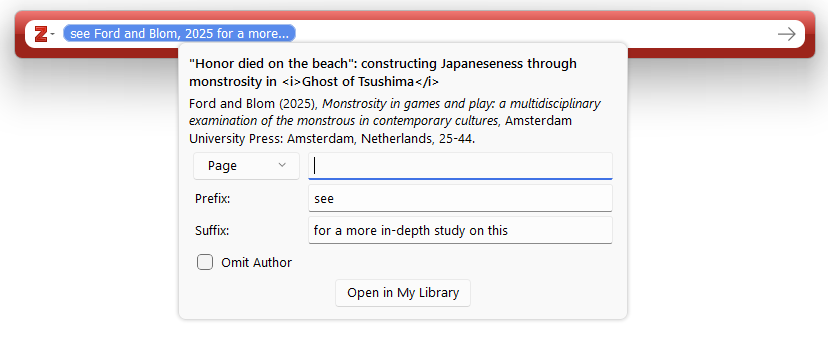
We don’t exclusively cite with the straightforward “(Smith, 2021, p. 36)”. Sometimes we want a cheeky “(see Smith, 2021, p. 36 for a more in-depth study on this)”. Many then revert to manual citation for this. But Zotero can handle this with prefixes and suffixes. It’s as simple as it sounds: write in the prefix whatever you want to appear in the parentheses before the citation, and in the suffix whatever you want to appear after. It also gives you a preview so you can check what it looks like.
Before you submit, save and then unlink
Another mild irritation as a copyeditor is when reference manager fields are left in the document. It can mess things up and can sometimes be a pain to remove. But, of course, when you submit you don’t always know that this will be the final version, so it makes sense that you don’t want to fully unlink yet.
When your document is ready, save it, then save a new copy (I just add _unlinked to the filename), then unlink that version. Make sure not to edit the unlinked version any further – go back to the other one if you need to. If there is any cleaning up to do in the unlinked version, do it after unlinking.
Edit the bibliography output in the document preferences
Sometimes you do want to edit a reference, but you don’t want to wait for it to be unlinked. Maybe you don’t want to forget about it, for instance. I’ve done this before when I haven’t wanted to include the book series and series volume in the reference (a bit overkill), but because that’s in the metadata, it will try to add it (depending on the referencing style selected). Go to the document’s Zotero document preferences, and from there you can edit the displayed output of each individual reference. Note that this prevents it from being automatically updated, so be sure that it’s not a reference that you’re going to update (for example, don’t do it with an online first article that you will likely want to update later down the line).
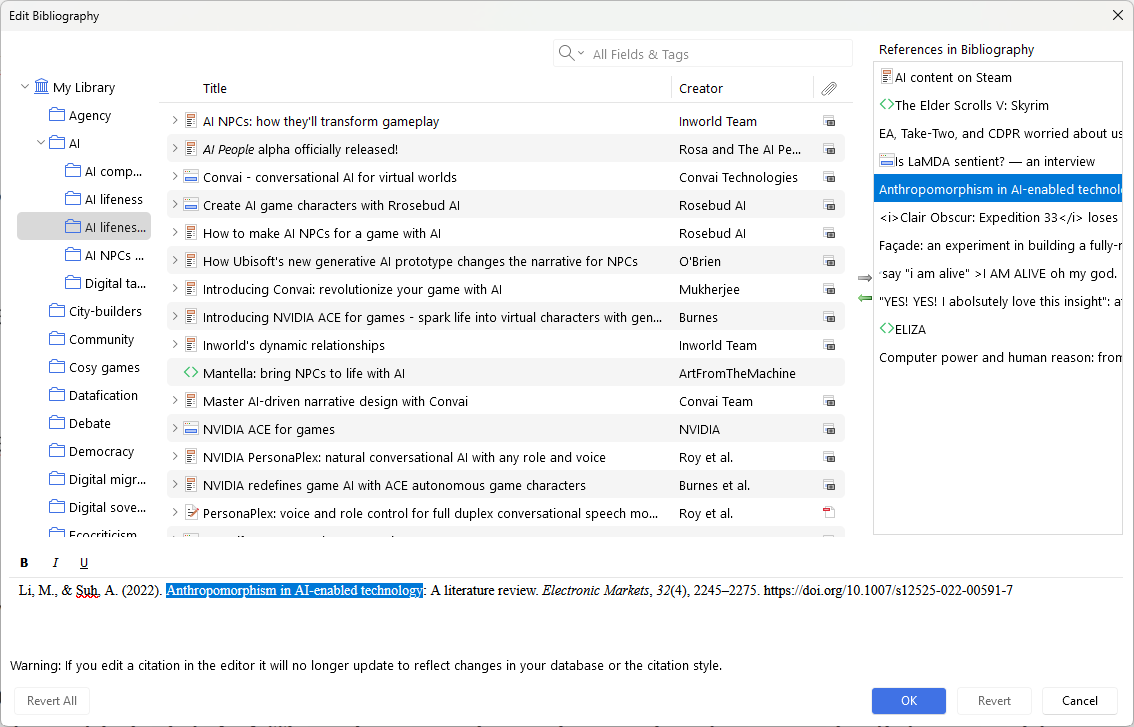
See where I’ve highlighted text – you can edit the reference output in that box.
Plugins are your friend
Zotero is solid on its own, and being open source, it’s already under community development. But there are also community-developed plugins which expand this even more. These do all sorts of things, from helping your Zotero connect to your file explorer better, to automatically retrieving DOIs periodically, to enhanced notetaking functionality, to library visualisation. It’s well worth browsing through the plugin library to see if there’s anything that helps your workflow.
There are also many plugins that aren’t listed there, but you’ll have to do your own digging for those. If you think of a feature that you wish Zotero had, do a quick search to see if someone has actually made a plugin for it. A small frustration with relying on plugins is that new versions can render them outdated, and plugin authors may not active maintain them.
Zotero is also an RSS feed manager – use it for journals and blogs
In the left-hand sidebar, scroll down to the bottom and you’ll see a collection called Feeds. Right click on that and you can add any RSS feed. This is especially useful for two things.
First, and most related to Zotero as a reference manager, you can add the RSS feeds of journals, which automatically populates with every new article that journal publishes. You can then click Add to “My Library” to immediately send that article to your library. (The RSS feed usually does not produce the cleanest metadata, so you will have to clean the entry a bit.)
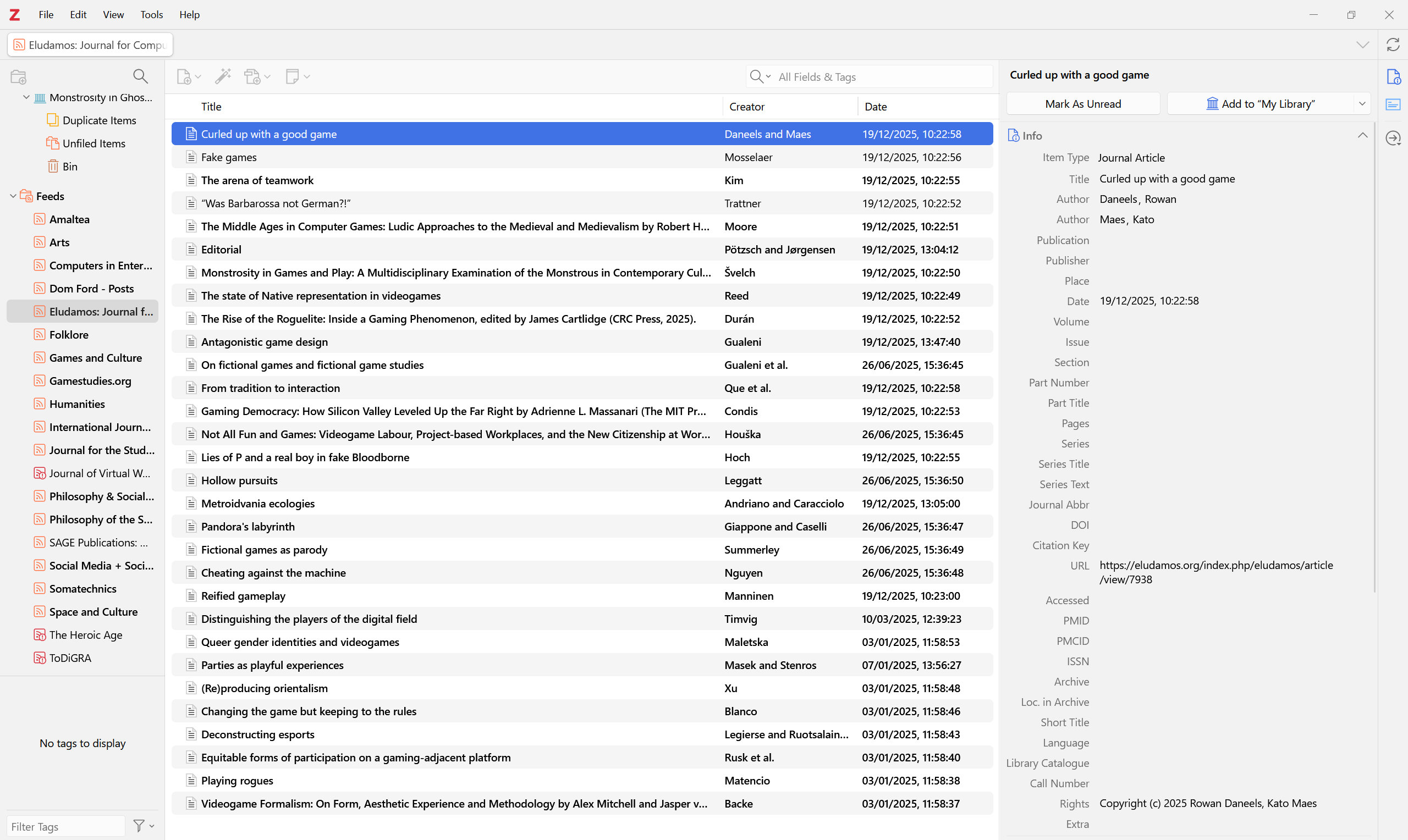
Second, you can add any RSS feed here. If you add a blog, you’ll be able to see any new blog post that comes out from that website. You can then either double click it to be taken to the URL for the blog post, or you can technically read it in-app. The content of the blog post goes into the Abstract field on the right-hand sidebar. It’s not the best reader, but it works!
Closing thoughts
Well, this has gotten a bit long. If you know me well, you know I am big on referencing formats. Don’t ask me why. But referencing is important, and proper use of a reference manager can save you enormous amounts of time and energy.
The good news if you’re looking to exorcise big tech is that the best reference manager is also the most ethical. It’s a great sign that we don’t have to compromise on quality or power when seeking ethical, free software. A reference manager is not a simple piece of software, yet it can nonetheless be produced and run by a non-profit, with open source code, and distributed for free.